The previous series treated the ML compiler as a general idea. Its last post (old Day 10) laid four systems side by side, torch.compile, TVM, XLA, TensorRT, and asked which layer each one lives at.
This new series does the opposite. It picks one system and drills straight down. The subject is torch.compile. It is the default acceleration path in PyTorch since 2.0, and one line gets you in:
model = torch.compile(model)It often runs two or three times faster, but it is not magic. Behind that one line is a pipeline with four stages. This post has a simple goal: to make those four stages clear, and to peel them apart by hand using a single argument. For the next 20 days, we walk down this pipeline one stage at a time.
One line, four stages
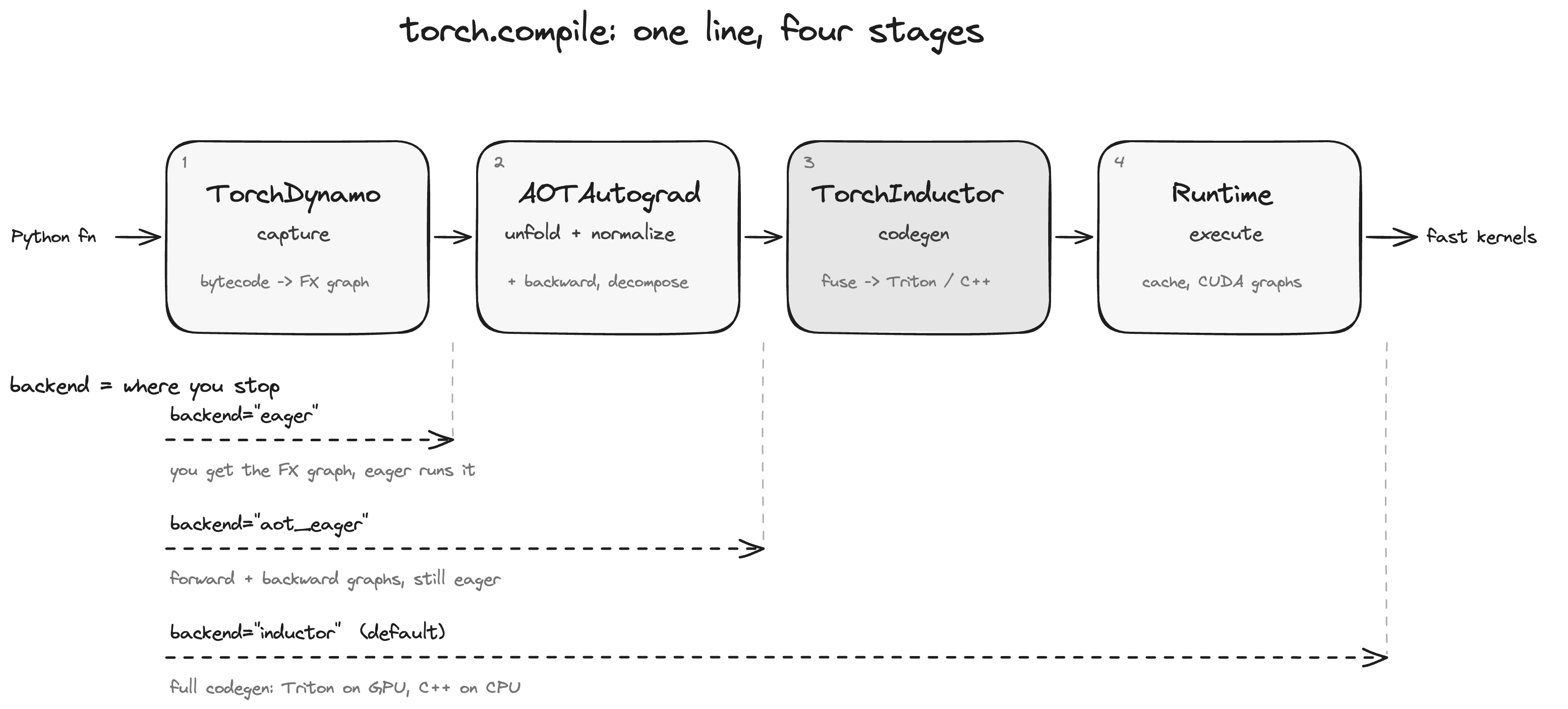
From your Python function to the code that actually runs on the GPU, torch.compile passes through four stages:
- TorchDynamo (capture): as your Python runs, it intercepts the bytecode and records it into an FX graph. When it meets Python it cannot understand, it breaks there and falls back to eager. That is a graph break.
- AOTAutograd (unfold and normalize): it unfolds the backward pass of the graph too (training needs it), normalizes the awkward things like in-place mutation and views into pure functional form, and then decomposes ops into a set of smaller primitive operations.
- TorchInductor (code generation): the default backend. It fuses and schedules the ops on the graph, then generates the actual kernels: Triton on GPU, C++ with OpenMP on CPU.
- Runtime (execution): it loads the generated kernels, manages caches, and where useful reaches for mechanisms like CUDA graphs to squeeze out launch overhead.
If you read the previous series, these four stages are one concrete filling of that "capture -> optimize -> codegen -> execute" skeleton. Dynamo is capture, AOTAutograd plus the front of Inductor is optimize, the back of Inductor is codegen. The difference this time is that we open each stage and read what it actually emits.
Feel the speedup first
Confirm the pipeline actually does something. Take a stretch of memory-bound elementwise work:
import torch

def f(x):
    return torch.sin(x) * torch.cos(x) + torch.tanh(x)

x = torch.randn(4096, 4096, device="cuda")

compiled = torch.compile(f)
compiled(x)  # the first call is what actually compiles; warm it up

# measure afterwards, and use CUDA events for accuracy
def bench(fn, iters=100):
    torch.cuda.synchronize()
    start, end = torch.cuda.Event(True), torch.cuda.Event(True)
    start.record()
    for _ in range(iters):
        fn(x)
    end.record()
    torch.cuda.synchronize()
    return start.elapsed_time(end) / iters

print("eager   ", bench(f))
print("compiled", bench(compiled))
Two details here that every later post will trip over:
- Compilation is lazy.
torch.compile(f)does almost nothing; it just wraps a layer aroundf. The real compilation happens on the first call with real inputs. So the first call is unusually slow, and you must warm up before measuring. - Those ops (
sin,cos,tanh, the multiply, the add) are five separate kernels under eager, each reading data from HBM and writing it back. Inductor fuses them into one Triton kernel: read once, compute all the way through, write once. That is where the speedup comes from.
Peel the pipeline apart with the backend argument
Now the heart of this post. torch.compile takes a backend argument, and it lines up exactly with the seams of the pipeline, letting you run only the front stages and switch off the rest:
# Dynamo only: capture into a graph, then run it as-is in eager, no codegen
f_dynamo = torch.compile(f, backend="eager")

# Dynamo + AOTAutograd: the graph is unfolded, normalized, decomposed, but still eager
f_aot = torch.compile(f, backend="aot_eager")

# The full pipeline: all the way to Inductor generating Triton / C++
f_full = torch.compile(f, backend="inductor")   # this is the default
The three backend names are easy to misread, so here is what stage each one reaches:
| backend | Dynamo capture | AOTAutograd unfold | Inductor codegen |
|---|---|---|---|
"eager" | yes | no | no |
"aot_eager" | yes | yes | no |
"inductor" | yes | yes | yes |
Notice the name backend="eager": it does not mean "no compilation". It still lets Dynamo intercept, build the graph, and install guards; it just does not generate new kernels, running the graph's ops as-is under eager. So it runs about as fast as native, but it still breaks the graph wherever the graph would break. That makes it a debugging lever later: if backend="eager" already misbehaves, the problem is in Dynamo's capture; if "eager" is fine but "inductor" breaks, the problem is in backend codegen. One argument slices the four-stage pipeline into segments you can inspect on their own.
To see what it actually captured, torch._dynamo.explain lays the result out:
import torch._dynamo as dynamo

explanation = dynamo.explain(f)(x)
print(explanation)   # how many graphs, how many graph breaks, and where they are
For clean pure-tensor work like f, you will see one graph and zero graph breaks. That is the ideal case. All of Day 2 through Day 4 is about "what makes that number worse", and how to fix it.
mode: the same pipeline, different aggressiveness
Besides backend, there is another argument you will see everywhere, mode, and it tunes how hard the backend tries:
torch.compile(f, mode="default")          # balanced, compiles fast
torch.compile(f, mode="reduce-overhead")  # adds CUDA graphs to kill launch overhead
torch.compile(f, mode="max-autotune")     # spends time autotuning the best kernel per shape
Just get the shape of it for now; the details are the subject of Day 17 (reduce-overhead and CUDA graphs) and the Inductor posts (autotuning). Keep only this: backend decides how far down the pipeline you go, mode decides how hard the last stage works.
How this series runs
Four stages, four parts over 20 days:
- Part 1 (Dynamo): how it intercepts bytecode as Python runs, what a guard is, why the graph breaks, and what the FX graph it emits looks like.
- Part 2 (AOTAutograd): how the backward is traced alongside, how in-place mutation is normalized, how ops are decomposed into primitives.
- Part 3 (Inductor): how the graph becomes loops, how it decides who fuses with whom, and most importantly, how to read the Triton and C++ it generates.
- Part 4 (advanced and integration): writing your own backend, the recomputation tradeoff in backward, CUDA graphs, caching, and the most common real-world trap, runaway recompilation.
One method runs through all of it: do not treat torch.compile as a black box. At every stage we use TORCH_LOGS or a debug switch to dump its intermediate output, and read it with our own eyes before moving on.
Next post
This post drew the whole pipeline. The next one (Day 12) drills into the first stage: how does TorchDynamo intercept your code "as Python runs"? The answer lives in a CPython mechanism called the frame evaluation hook (PEP 523). We will lay the bytecode out with dis, see which layer Dynamo works at, and understand why this design lets it swallow almost any Python yet always has to break in certain places.